The short answer
8D audio = a song that circles your head. It's an effect, not a format: auto-panning plus head-related filtering and reverb, saved as a normal stereo MP3. It took off on YouTube around 2018 under titles like "8D audio, use headphones", and it only works on headphones.
8D audio meaning: what the "8D" stands for
Nothing technical. There's no eighth dimension, no official 8D standard and no special file type. The name followed the 3D, 4D and 5D labels used for cinemas and theme-park rides, where a bigger number sounds more immersive. Engineers who write about it tend to describe 8D audio as "rotation around the head plus reverb", and that's an accurate summary.
So the practical 8D audio meaning is: take a finished song, make it orbit the listener, and export it as regular stereo. Any phone, browser or streaming app can play the result, because to them it's just another MP3.
How does 8D audio work?
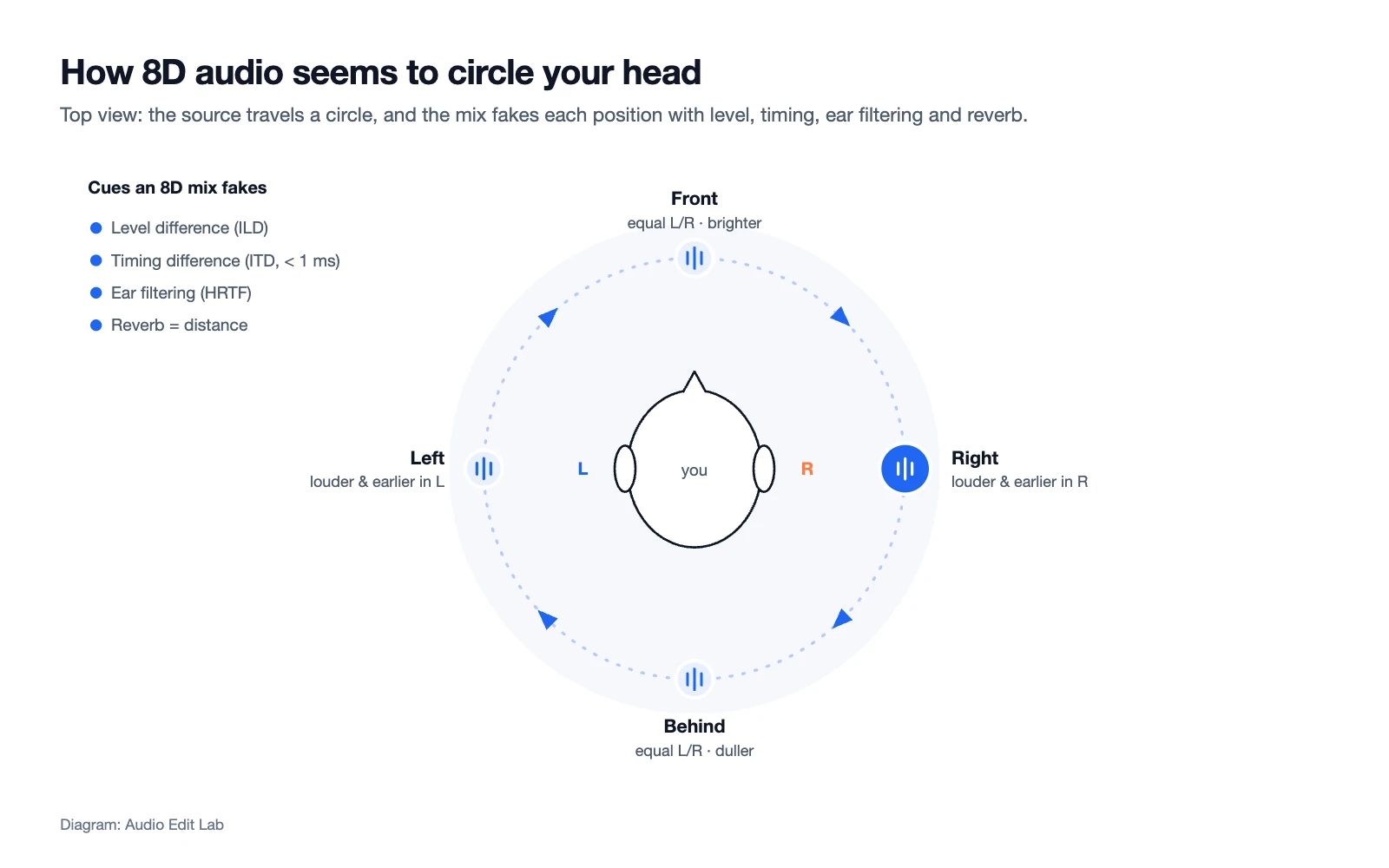
Your brain works out where a sound comes from by comparing what your two ears hear. An 8D mix manufactures those differences on purpose.
| Cue | What your ears notice | What the 8D effect does |
|---|---|---|
| Level difference | A sound on your right is louder in your right ear, because your head shadows the left ear. | Turns one channel up while the other goes down, in a smooth loop. |
| Timing difference | The near ear hears it a fraction of a millisecond earlier. | A binaural (HRTF) panner adds those tiny delays. |
| Ear filtering (HRTF) | The shape of your outer ear colours sound differently from the front and from behind. | Filters the sound by position, so it can seem to pass behind you, not just from ear to ear. |
| Reverb | Reflections tell you a sound is out in a room, not inside your head. | Adds a room around the moving source so it feels outside your head. |
Panning: level trades between your ears
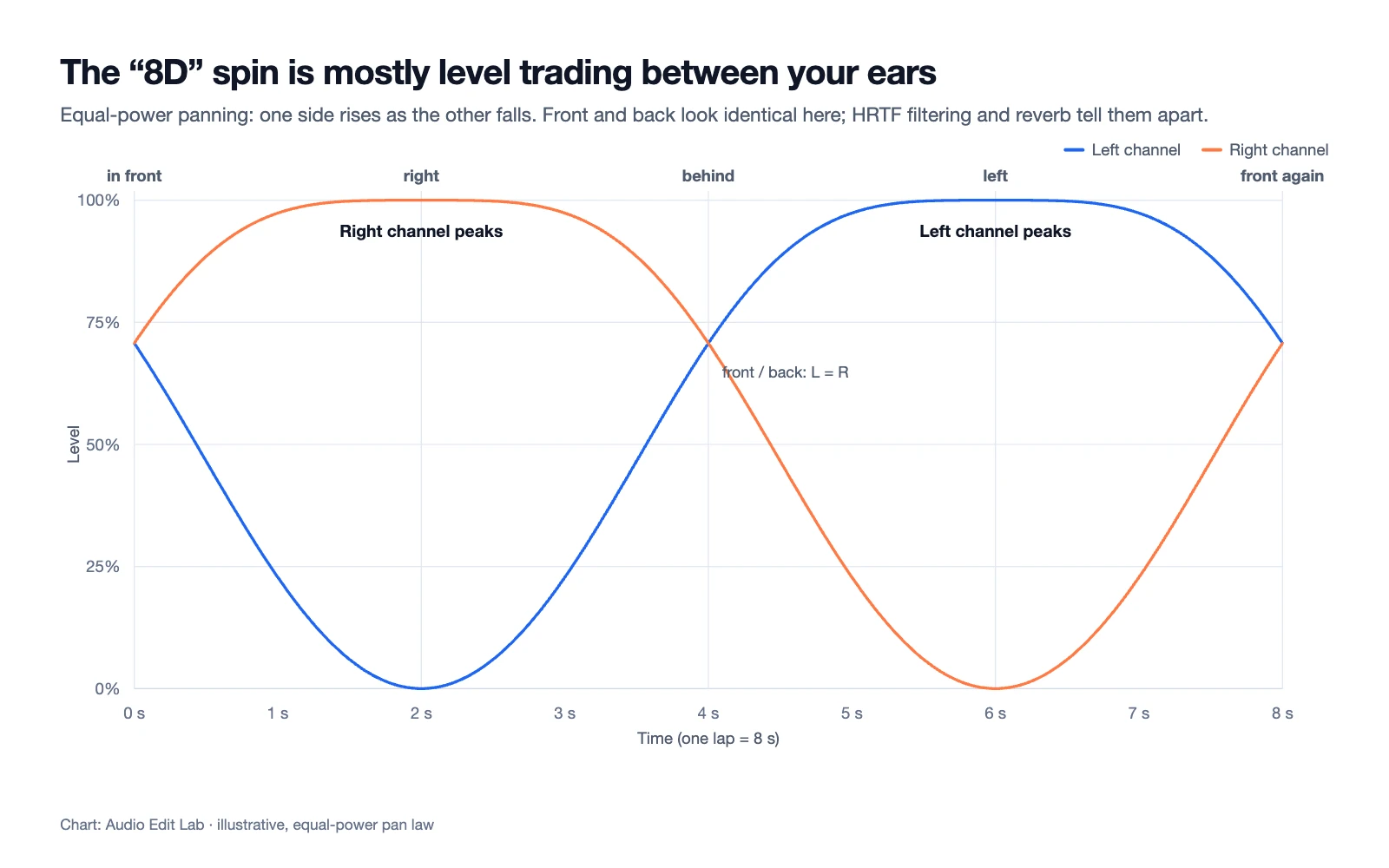
The cheapest 8D effect is just automated panning: the left channel rises as the right one falls, then the other way round. It's convincing from side to side, but front and back come out identical, so the "circle" feels more like a pendulum.
HRTF: how it seems to pass behind you
Better converters use a head-related transfer function (HRTF), a set of filters measured on real ears. We ran our demo song through an HRTF panner circling once every 8 seconds and measured what each ear received:
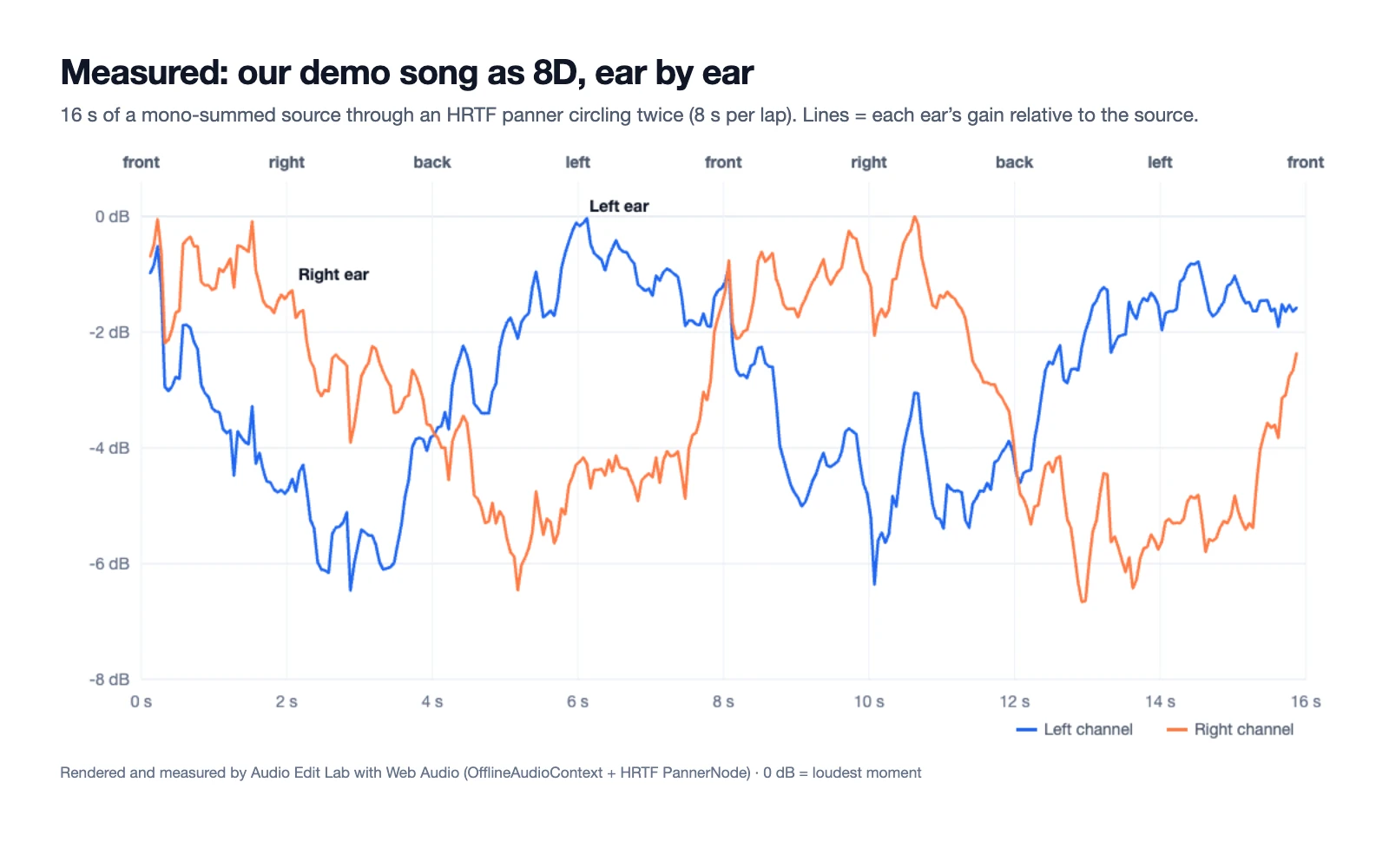
The level swing is only a few decibels for a full song, smaller than many people expect. Most of the "behind you" impression comes from the tone change, which is also why it varies from person to person: the filters were measured on someone else's ears.
Reverb: pushing the sound out of your head
Dry sound on headphones tends to feel like it sits inside your skull. A moderate room reverb gives the brain distance cues and makes the orbit feel wider. Too much, though, and the movement smears into a wash.
Why 8D audio needs headphones
On headphones, the left channel reaches only your left ear and the right channel only your right. That isolation is what lets a mix control the level, timing and tone each ear gets.
On speakers, sound from both speakers reaches both ears, so those carefully built differences cancel out, and a phone's single speaker plays the song in mono with no movement at all. Any pair of headphones or earbuds will do; you don't need anything expensive.
8D audio vs binaural vs spatial audio
8D is the newest of several ideas about placing sound around a listener. The oldest goes back to 1881, when Clément Ader wired telephone transmitters on the Paris Opera stage to listening rooms at the Paris Electrical Exhibition, giving visitors one receiver for each ear.
| 8D audio | Binaural recording | Spatial audio (e.g. Dolby Atmos) | |
|---|---|---|---|
| What it is | An effect applied to a finished stereo song | A recording made with two microphones at ear positions, often in a dummy head | A mix where each sound is placed separately and rendered for your device |
| What moves | The whole song, usually in a flat circle | Whatever moved during the recording | Each instrument independently |
| File | Normal stereo MP3 / WAV | Normal stereo | Special format plus a renderer |
| Playback | Headphones | Headphones | Compatible app or device |
8D audio, focus and sleep
Playlists often market 8D music for studying, sleep or ADHD. Treat that as a listening preference, not a treatment: some people find the motion absorbing, others find it distracting. If it helps you settle in, enjoy it; if not, plain stereo is fine.
How to make 8D audio from any song
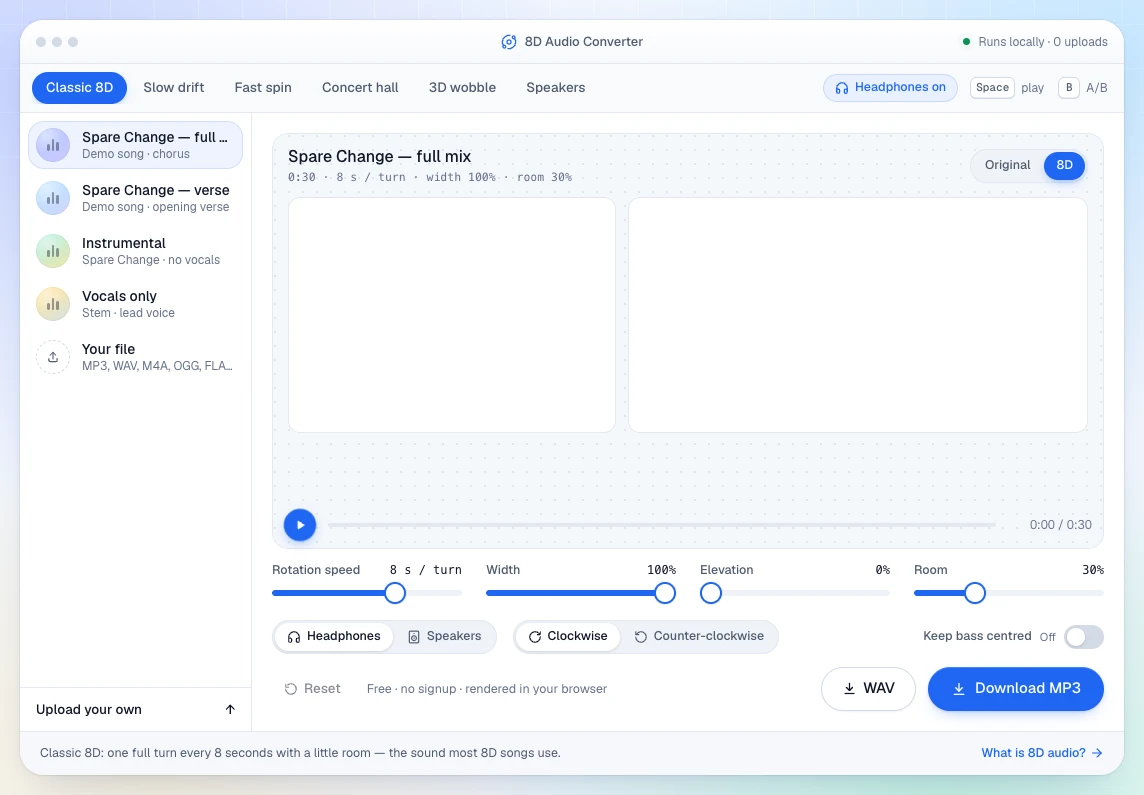
Our 8D audio converter builds the effect in your browser with the same parts described above: the song is summed to mono, sent around an HRTF panner and placed in a room.
- 1
Add a song
Drop in an MP3, WAV, M4A, OGG or FLAC file (up to 100 MB), or start with a demo track. Put your headphones on before pressing play.
- 2
Choose how it moves
Classic 8D makes one lap every 8 seconds with a light room. Slow drift (16 s per lap) feels calm; Fast spin (about 3 s) feels dizzy and dramatic. The Speakers preset swaps the binaural panner for a simpler left-right sweep that survives speaker playback better, though headphones still sound best.
- 3
Keep the low end steady
If kicks and bass feel seasick, turn on Keep bass centred: everything below about 150 Hz stays in the middle while vocals and synths orbit.
- 4
Set the room and export
A little reverb pushes the sound outside your head; more turns it into a hall. Then download the result as MP3 or WAV.
Want the dreamy "8D slowed + reverb" style you see on YouTube? Slow the song first in the slowed + reverb studio, then run the export through the 8D converter.