
Checked November 2026
We re-checked Spotify's help pages, newsroom and recent reports on 15 November 2026. Spotify changes features often and tests them on small groups first, so your app may differ slightly.
How to slow down songs on Spotify: what the app can do today
Spotify does have a speed button. It just isn't for music. Here's where it works and where it doesn't:
| What you're playing | Speed control? | Details |
|---|---|---|
| Podcasts (audio and video) | Yes | 0.5× to 3.5× from the 1x button in Now Playing; free and Premium |
| Audiobooks | Yes | Same button, for any audiobook your plan lets you play |
| Songs in the normal player | No | Still one of the most requested ideas on Spotify's community board |
| Songs in Running Mode | Partly | Premium only; nudges tracks toward a target BPM during a run |
| "Change song speed" menu | Testing only | Found in Android app code (May 2026) and seen by a few users; not announced |
Two newer features show a song's BPM but don't change its speed: Mixed playlists (Premium transitions, launched 2025) and Smart Reorder (February 2026), which sorts a mixed playlist by tempo and key. Neither makes a track slower.
Watch out for 'Spotify speed' downloads
Converter apps that "download Spotify songs" to change their speed work by recording or stripping the stream. That breaks Spotify's terms of use and can get an account suspended. Offline downloads inside Spotify are encrypted and only play in the app.
The one exception: Running Mode (Premium)
Spotify launched Running Mode on 30 July 2026 inside its Fitness hub. It builds a run playlist around a pace, and with Beat Matching on you pick a target BPM (160 BPM is the most popular setting, according to Spotify). A toggle called Adjust song speed to match BPM then speeds songs up or down slightly so every track lands on that tempo.
- 1
Open the Fitness hub
In the Spotify app, open the Fitness hub and choose Running Mode. It's for Premium users in the US, Canada, the UK, Ireland, Australia, New Zealand and Sweden.
- 2
Turn on Beat Matching
Pick a preset, switch on Beat Matching and set your target BPM.
- 3
Allow speed changes
Switch on Adjust song speed to match BPM. Leave it off to hear each song at its original speed.

It's a fitness feature, not a slowed + reverb button. You can't open a song, drag it to 0.8× and keep listening.
Option 1: look for official slowed or sped-up versions
Many labels now release their own versions. Search Spotify for the song title plus slowed, slowed + reverb, sped up or nightcore. Official edits count as normal streams for the artist and play at full quality on any account. The catch: only popular songs get them, and the speed is chosen for you.
Option 2: slow down a song you own (works on any track)
If the song isn't available as a slowed version, change the speed yourself. You need an audio file you have the right to use: a song you bought (Bandcamp, iTunes and other stores sell DRM-free files), your own recording, or a royalty-free track.
- 1
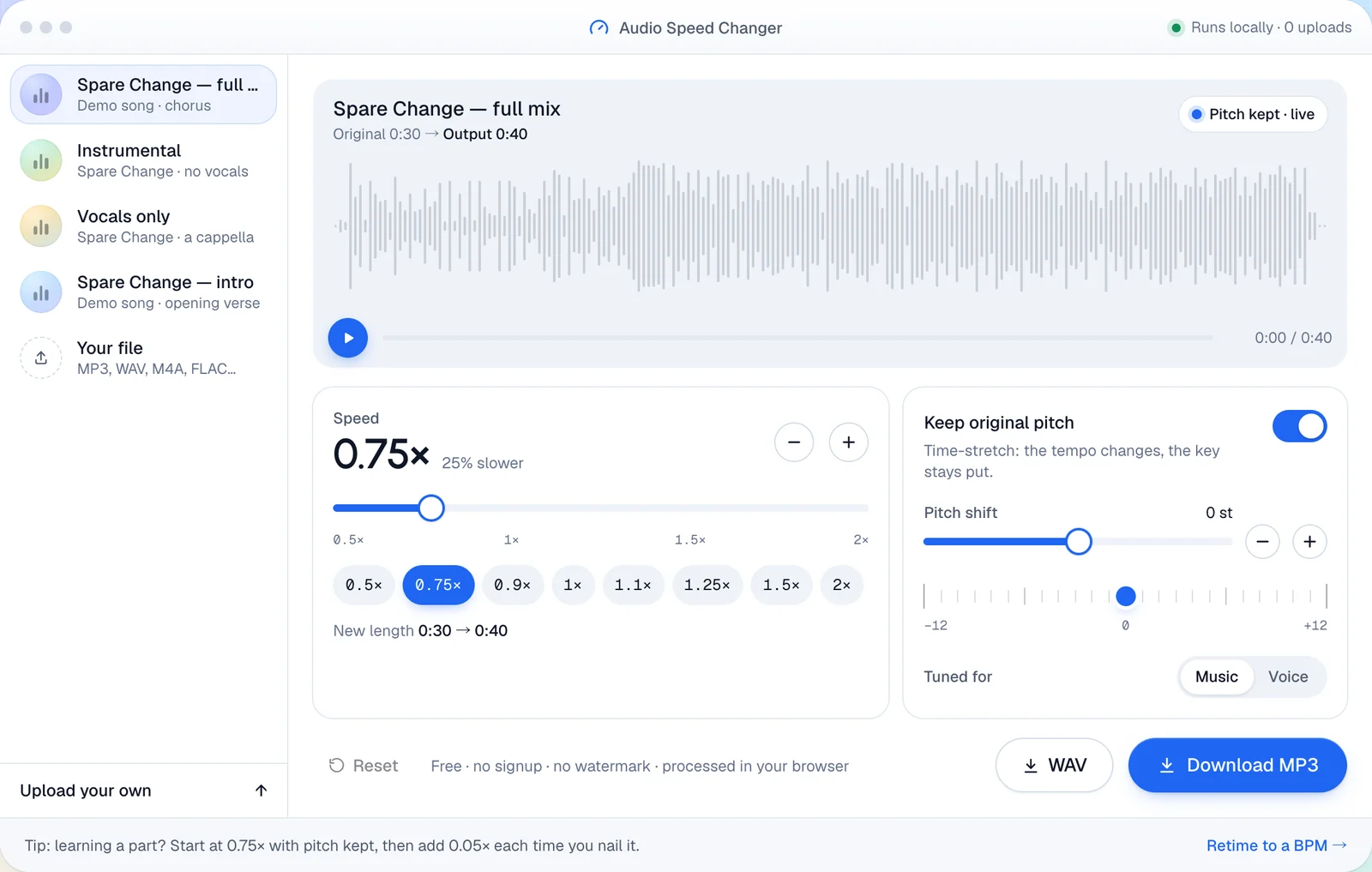
Open the Audio Speed Changer
It runs in your browser, so nothing is uploaded. Drop in an MP3, WAV, M4A or FLAC file up to 100 MB, or try a demo song first.
- 2
Pick a speed
Tap 0.75× or 0.9×, or fine-tune in 0.01× steps. 0.8× is the classic slowed setting.
- 3
Decide on pitch
Leave Keep original pitch on to stay in the same key. Turn it off, or shift down a few semitones, for the deeper "slowed" sound.
- 4
Listen, then download
Play it back, then download MP3 for your phone or WAV for editing.
Want the full slowed + reverb sound?
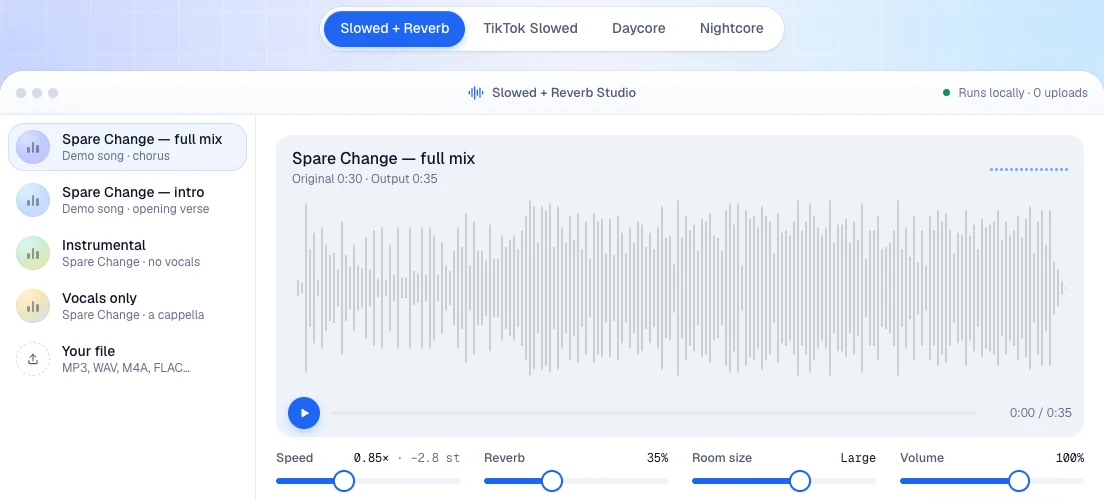
Speed alone sounds a little dry. Our home page studio adds the reverb and lowers the pitch in one go, with presets for Slowed + Reverb, TikTok slowed, Daycore and Nightcore.
How to speed up a song on Spotify
It's the same story in the other direction: podcasts and audiobooks go up to 3.5×, songs don't move. Search for an official sped up version first. If there isn't one, open your file in the speed changer and choose 1.25×, a common setting for sped-up TikTok edits. Turn pitch-keeping off and the vocals rise too, which gives a nightcore-style sound.
Speed settings that work
| What you want | Speed | Pitch |
|---|---|---|
| Subtle late-night version | 0.9× | Kept |
| Classic slowed + reverb | 0.8× | Lowered with the tempo |
| Learning a riff or a lyric | 0.5–0.75× | Kept |
| Sped-up edit | 1.2–1.3× | Raised |
| Catching up on a talk or lecture | 1.25–1.5× | Kept |
Speed and pitch: why slowed songs sound deeper
A record played at the wrong speed changes both tempo and pitch. That's "varispeed", and it's where the slowed sound comes from: at 0.8× the music drops by almost 4 semitones (12 × log2 0.8 ≈ −3.9). Modern time-stretching splits the two, so you can slow a song without making it deeper. That's what the Keep original pitch switch does.
Copyright and personal use
Slowing down music you own for your own listening, practice or study is fine. A slowed or sped-up upload of someone else's song is still their recording: get permission or use a licensed track before you post it, or expect it to be muted or taken down.