The short answer
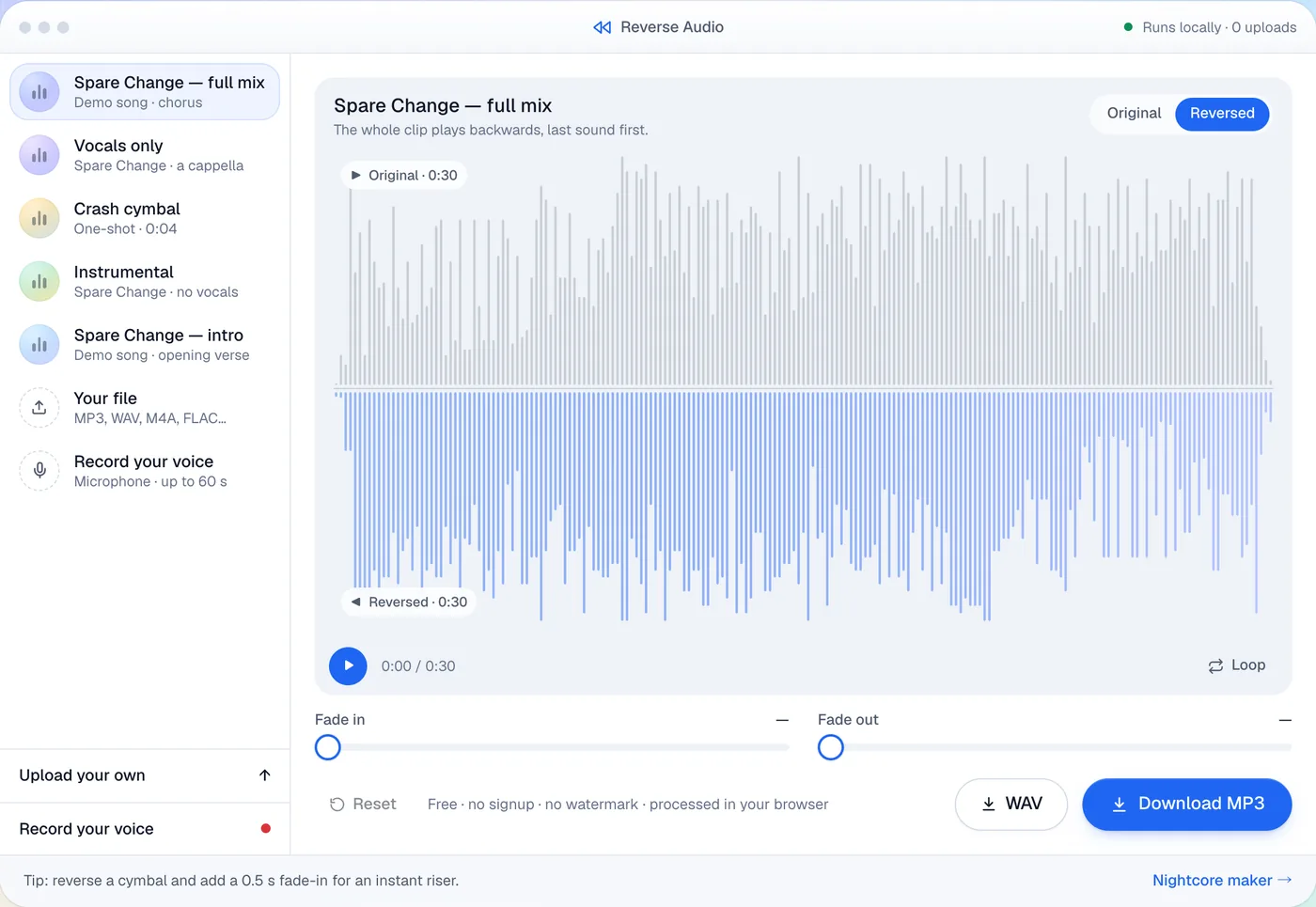
Online: drop the file into our Reverse Audio tool and download the MP3. Audacity: Effect → Special → Reverse. CapCut: Reverse works on video clips, so reverse the clip, then use Extract audio.
What reversing audio actually does
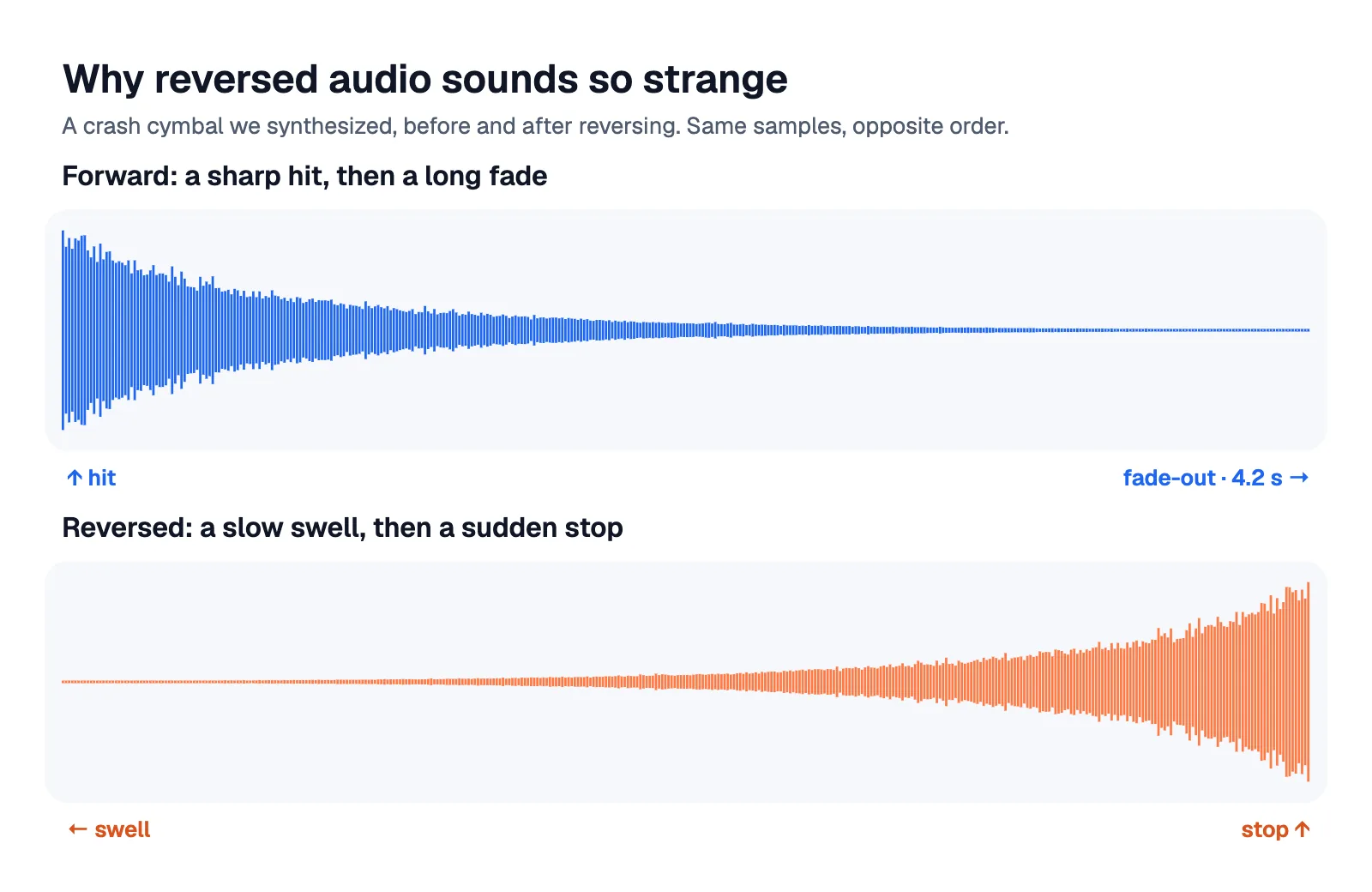
Digital audio is a long list of samples, 44,100 per second for CD-quality sound. Reversing plays that list from the last sample to the first. Nothing is added or lost: the length, pitch and quality stay the same. What changes is the shape of every sound. A drum hit or a piano note starts loud and fades out; reversed, it fades in and stops dead. That's why reversed cymbals become risers and reversed speech sounds like an alien language.
Drag the handle to compare six seconds of an a cappella vocal with its reversed version. The waveform is a perfect mirror image: the pause that came late now comes early.
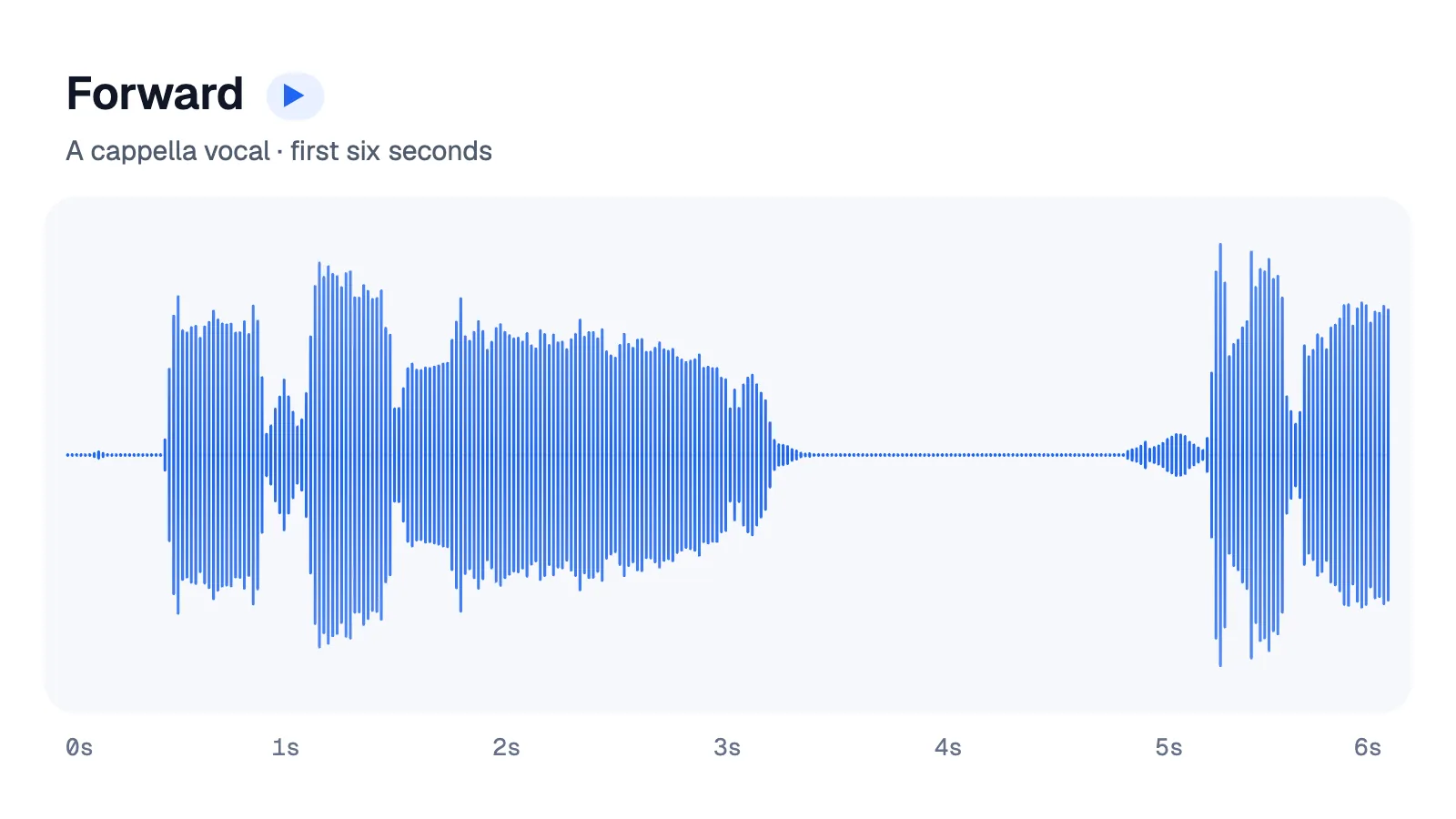
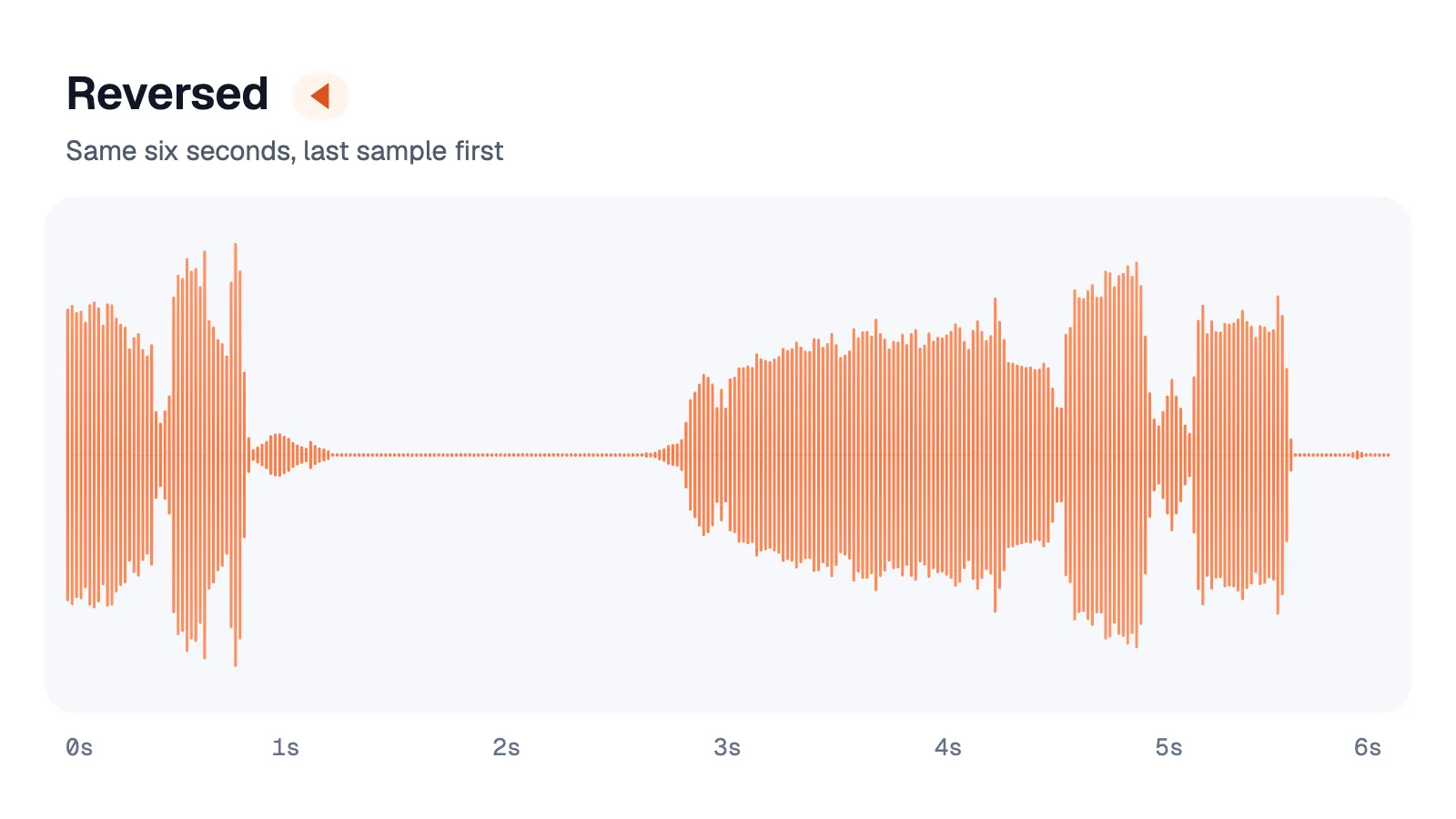
Drawn from our demo vocal. Left: forward. Right: reversed.
How to reverse audio online (free)
Our Reverse Audio tool works in any modern browser, on desktop and on phones, and the file never leaves your device.
- 1
Add a sound or record one
Drop in an MP3, WAV, M4A, OGG or FLAC up to 100 MB, or press Record and speak or sing for up to 60 seconds.
- 2
Choose what to flip
Whole track, One part (drag across the waveform), Palindrome (forward, then backward) or Reverse reverb (a swell that rises into each sound).
- 3
Download
Switch between Original and Reversed to check it, add a fade if you like, then save it as MP3 (192 kbps) or WAV.
Checked November 2026
The steps below were checked on 16 November 2026 against CapCut's own guides (updated February and August 2026), the Audacity manual, Apple's GarageBand guides (GarageBand 10.4.14 for Mac, 2.3.20 for iPhone) and Adobe's Premiere help (updated 10 November 2026). Apps change their menus often, so pick the closest match if a label differs.
How to reverse audio in CapCut PC
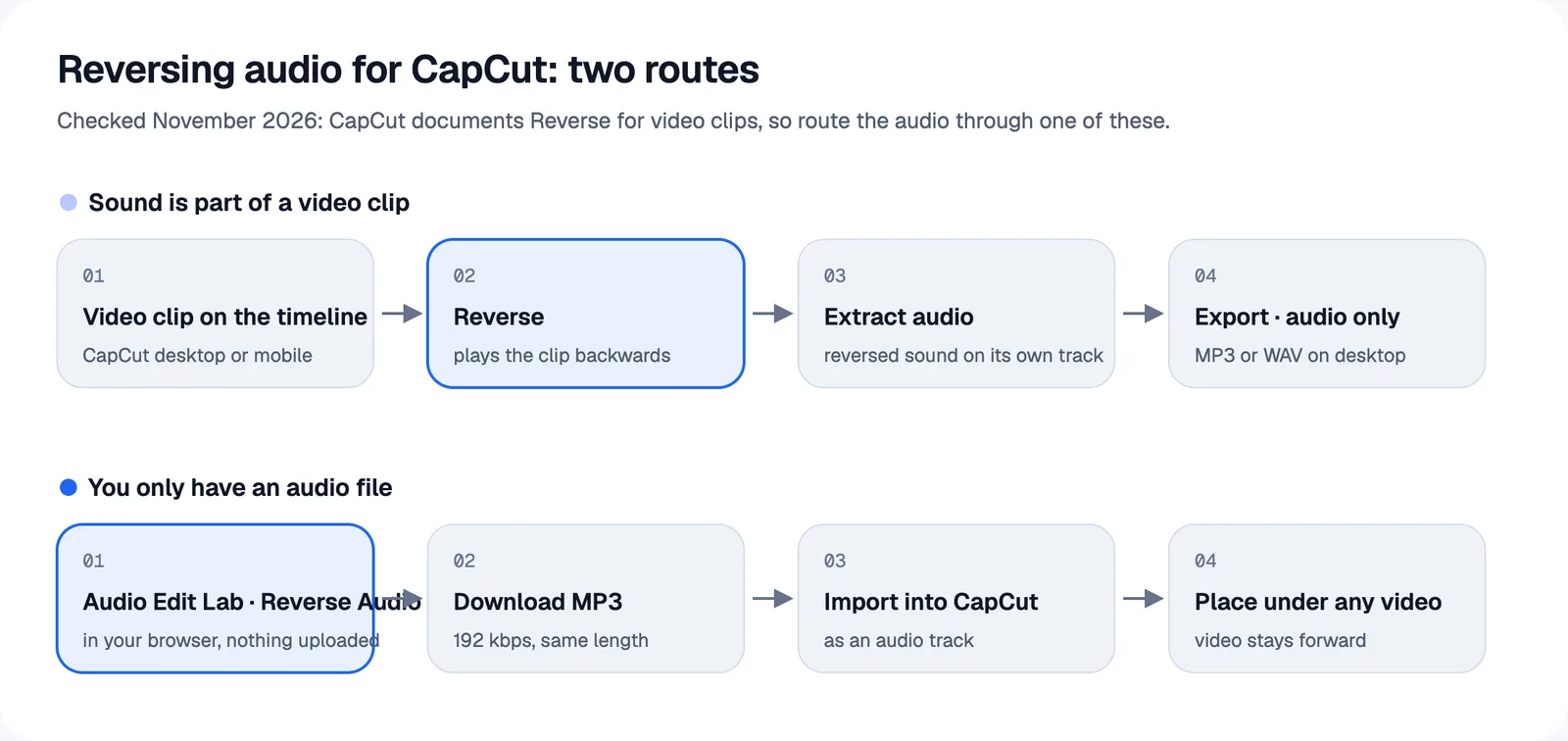
CapCut's own guides reverse a video clip and then pull the sound out of it. Here's that route on Windows or Mac:
- 1
Add the clip
Start a new project, click Import and drag the video onto the timeline.
- 2
Reverse it
Select the clip and click Reverse (above the timeline, or right-click the clip). CapCut processes it and plays the clip backwards, sound included.
- 3
Extract the audio
Right-click the reversed clip and choose Extract audio. The backwards sound appears as its own track below the video.
- 4
Export audio only
Click Export, untick video, tick audio and pick a format such as MP3 or WAV.
Only have an audio file? CapCut's guides don't show Reverse on standalone audio, and several third-party guides report the button is greyed out when an audio clip is selected. Two workarounds: reverse the file in a browser tool and import the MP3 as an audio track (fastest), or place the audio under a still image, export that as a video, import it again and follow the steps above.
How to reverse audio on CapCut mobile
On iPhone or Android the idea is the same: tap New project, add the video, tap the clip and choose Reverse in the bottom toolbar, then tap the reversed clip and choose Extract audio. CapCut's mobile guide doesn't describe an audio-only export, so if you just need the sound file, the browser route is quicker: our tool runs in mobile Safari and Chrome and saves an MP3 straight to your phone.
How to reverse audio in Audacity
Select the audio (or press Ctrl+A / Cmd+A for everything) and choose Effect → Special → Reverse. There's no dialog box; it applies instantly, and applying it again restores the original. The Audacity manual also describes the reverse reverb trick: reverse the selection, add reverb or delay, then reverse it back so the tail arrives before the sound.
How to reverse audio in GarageBand
- Mac: double-click an audio region to open the Audio Editor, then tick Reverse Playback in its inspector. Apple suggests it for things like reversed cymbals and psychedelic backing tracks.
- iPhone and iPad: double-tap the region, choose Settings from the menu and turn on the Reverse switch, then tap Done.
Both are non-destructive: switch them off and the region plays forward again. Export the song as usual to get the reversed audio.
How to reverse audio in Premiere Pro
Select the clip in the timeline and choose Clip → Speed/Duration (or right-click → Speed/Duration). Tick Reverse speed and leave Speed at 100% so the pitch doesn't change, then click OK. Adobe's help, which now calls the app simply Premiere, says Reverse speed plays the clip backwards; on a clip with sound, that includes the audio. Render a preview if playback stutters.
How to reverse audio on iPhone
| Option | Best for | Notes |
|---|---|---|
| Safari + our Reverse Audio tool | Songs, voice notes, quick voice recordings | Open from Files or record up to 60 s; saves an MP3 |
| GarageBand (free from Apple) | Musicians building a track | Region → Settings → Reverse |
| CapCut | Sound that's already part of a video | Reverse the clip, then Extract audio |
Apple's Voice Memos guide lists trimming, replacing, playback speed and Enhance Recording, but no reverse option, so record there and reverse the file with one of the options above.
Backmasking: a few true stories
Playing a record backwards to find hidden words is called backmasking. A few facts, checked against the history books:
- 1966: The Beatles brought reversed sound into pop. John Lennon said he discovered it by accident while making Revolver; the single "Rain" ends with his vocal played backwards.
- 1969: after a caller's tip, Detroit DJ Russ Gibb played "Revolution 9" backwards on air, and the "Paul is dead" rumour took off.
- Early 1980s: claims that Led Zeppelin's "Stairway to Heaven" hid satanic messages fuelled a moral panic. A US congressman proposed warning labels in 1982; the bill never passed. Led Zeppelin's label replied: "Our turntables only play in one direction—forwards."
- 1975 and 1983: after being accused of hiding messages, Electric Light Orchestra put deliberate backwards messages on Face the Music ("Fire on High") and later named an album Secret Messages.
- 1984: "Weird Al" Yankovic hid a reversed joke about Satan and Cheez Whiz in "Nature Trail to Hell".
- 1985: psychologists John Vokey and J. Don Read found that listeners couldn't detect backward messages and weren't influenced by them. The "messages" mostly come from the listener's brain building words out of noise.
Want to try it yourself? Record a line in the Reverse Audio tool, learn the backwards version, record yourself singing it, and reverse that: it's the reverse singing challenge, and the original words come back surprisingly clearly.